
 Lifestyle & Well-being Assistant
ANZAC Day Word Search
Best on a laptop or TV
Slideshow
One picture at a time to discuss!
- No scores
- Good for chatting
- 1 Every item fills the screen
- 2 Next slide with the arrow keys or a clicker
- 3 Let the room share their memories
Word Search
Spot the hidden words!
- One group or teams
- Words
- 1 Someone calls out a word
- 2 Tap it and click "Show where"
- 3 The grid rings it for everyone
Playing on a TV
Get any game onto your TV!
- 1 Plug your laptop into the TV with an HDMI cable
- 2 Press Input or Source on the TV remote and pick that HDMI port
- 3 Pick a game from the list. The TV shows your screen
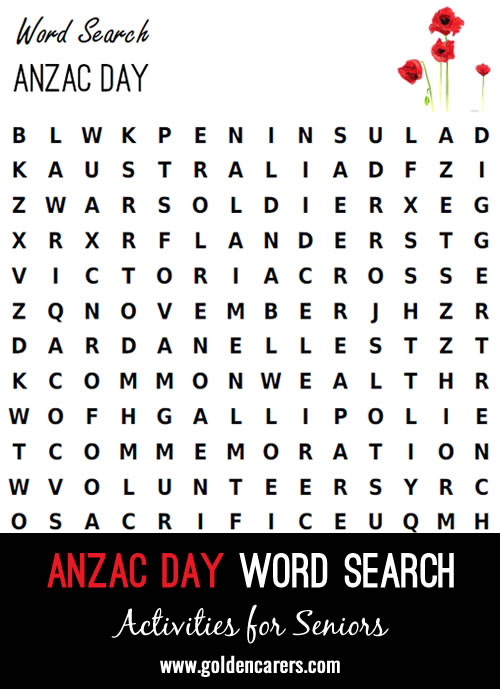
ANZAC Day Word Search
Available with Full Membership. Unlock to access:
Full Membership - $74.95 USD per year
No auto-renewals · 30-day money-back guarantee
Your workplace can pay: choose Invoice at checkout.
Already a member? Log in
Hi Janine, thanks for the suggestion. I hadn't tried that but I gave it a go and it worked! It's good to know I can use this for other topics too. Appreciate it!
This is a really good idea. Because it's ANZAC, and because I'm from New Zealand, I just wish it had 'New Zealand' amongst the word list too!
Program Manager
Hi Cathy, I'm in Australia & I made this with Oz in mind. Did gou know you can make your own ones on here? Highly recommend it. I do it all the time.
Once I did one with my seniors making suggestions on a topic then input it to the DIY page. We printed it off & completed it immediately. Good fun.


 Diversional Therapist
I have been finding this site great for ideas. Really like the fabric and felt poppies craft. Am going to try with my residents. Thank you Golden carers. Judy Dwyer Diversional therapist New Zealand

 Activity Director
Hi Judy
Thanks for your kind words
Glad this website is such an inspiration to you
Lifestyle & Well-being Assistant
A new activity has been posted by a Golden Carers member: Wordsearch



ANZAC Day Word Search
Best on a laptop or TV
Slideshow
One picture at a time to discuss!
- No scores
- Good for chatting
- 1 Every item fills the screen
- 2 Next slide with the arrow keys or a clicker
- 3 Let the room share their memories
Word Search
Spot the hidden words!
- One group or teams
- Words
- 1 Someone calls out a word
- 2 Tap it and click "Show where"
- 3 The grid rings it for everyone
Playing on a TV
Get any game onto your TV!
- 1 Plug your laptop into the TV with an HDMI cable
- 2 Press Input or Source on the TV remote and pick that HDMI port
- 3 Pick a game from the list. The TV shows your screen