
 senior manager
Picnic Bingo
Best on a laptop or TV
Bingo caller
Calls bingo on a big screen!
- Needs printed cards
- Any group size
- 1 Print the cards and hand out pens
- 2 Click "Call", press Space, or use the auto-caller
- 3 Someone shouts Bingo? Use the card checker
Slideshow
One picture at a time to discuss!
- No scores
- Good for chatting
- 1 Every item fills the screen
- 2 Next slide with the arrow keys or a clicker
- 3 Let the room share their memories
Image Reveal
A jigsaw guessing game!
- One group or teams
- Guessing
- 1 Call a number to turn a piece
- 2 Anyone can guess at any time
- 3 Got it? Click "Show answer"
Memory Match
Find the matching pairs!
- Teams
- 6, 8 or 12 pairs
- 1 Call two numbers to turn two cards
- 2 A pair? Go again
- 3 No pair? Next team's turn
Playing on a TV
Get any game onto your TV!
- 1 Pick a game. It opens in a new tab
- 2 Plug your laptop into the TV with an HDMI cable
- 3 Play from your laptop. The TV shows your screen
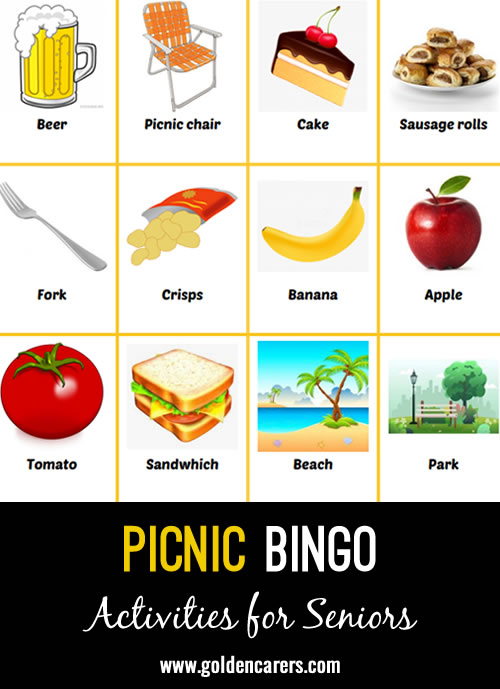
Picnic Bingo
Available with Full Membership. Unlock to access:
Full Membership - $74.95 USD per year
No auto-renewals · 30-day money-back guarantee
Your workplace can pay: choose Invoice at checkout.
Already a member? Log in
Activities Coordinator
The ladies & gents at Ashgrove Care Home in England love playing picture bingo.
This one is their favourite (& mine ) it brought up memories of them going in picnics with their families.
So it was a 2 in 1 activity: Bingo & reminiscent Activity
Thank you so much
From us all at Ashgrove



 Recreation Programmer
Hello Kelly, thank you for the picnic bingo and adding the free one in the middle! So many residents would ask me that question. ;) My residents love picture bingo! I want to create my own themes but not sure how to do them, are you able to give me some guidance where to take the pics? I've tried in the past but not much success.

Hi Nathalie!
This Picture Bingo is created using the Golden Carers DIY Bingo creator:
https://www.goldencarers.com/create-your-own-bingo-games/7897/
You can create a Picture Bingo game in minutes using images from the web, or using our in-built search feature.
Hope that helps!




Picnic Bingo
Best on a laptop or TV
Bingo caller
Calls bingo on a big screen!
- Needs printed cards
- Any group size
- 1 Print the cards and hand out pens
- 2 Click "Call", press Space, or use the auto-caller
- 3 Someone shouts Bingo? Use the card checker
Slideshow
One picture at a time to discuss!
- No scores
- Good for chatting
- 1 Every item fills the screen
- 2 Next slide with the arrow keys or a clicker
- 3 Let the room share their memories
Image Reveal
A jigsaw guessing game!
- One group or teams
- Guessing
- 1 Call a number to turn a piece
- 2 Anyone can guess at any time
- 3 Got it? Click "Show answer"
Memory Match
Find the matching pairs!
- Teams
- 6, 8 or 12 pairs
- 1 Call two numbers to turn two cards
- 2 A pair? Go again
- 3 No pair? Next team's turn
Playing on a TV
Get any game onto your TV!
- 1 Pick a game. It opens in a new tab
- 2 Plug your laptop into the TV with an HDMI cable
- 3 Play from your laptop. The TV shows your screen